66% Steps Reduction

Project Overview
An audit of a symptom tracking and medication management app. Four problems found by using the product as a real user would, four solutions designed within the existing brand language.
Industries
Healthtech
Health Management
Services
Healthtech
Audit
Research
Year
2025
The Problem
Every problem was found the same way: by using the product without documentation, making the same mistakes a real user would make and reading what real users said in the Play Store.
A button that looked right but wasn't
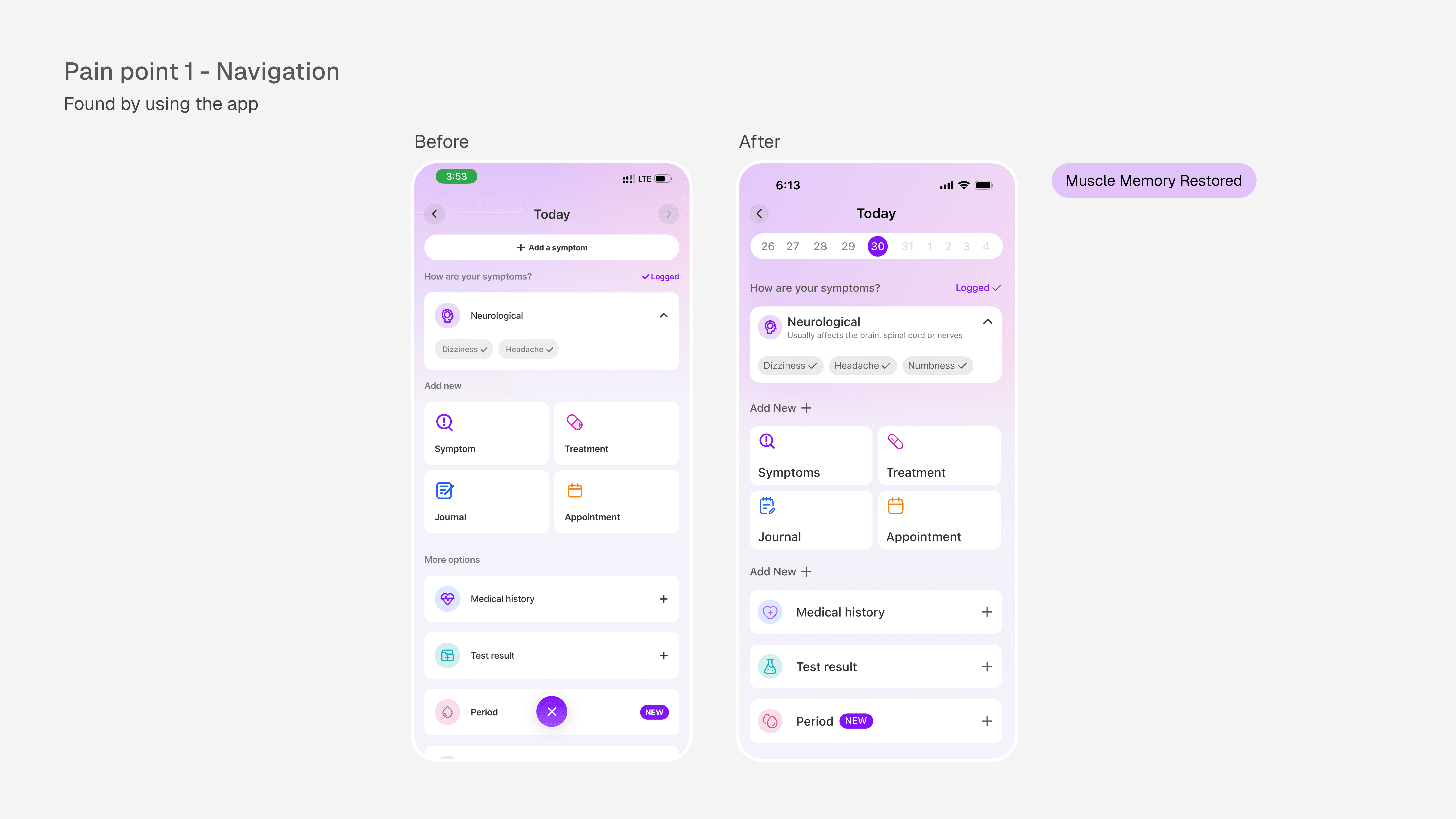
On the "Log Today" screen, the top left corner is occupied by a left arrow, the universal signal for go back. It doesn't go back. It controls the calendar component instead. The actual exit button is an X icon placed at the bottom center of the screen. Every other screen in the app has the back button exactly where users expect it, this one screen is the odd one out and that inconsistency violates Nielsen's consistency heuristic in the most disruptive way possible. Through muscle memory
The Fix
Redesigned the calendar component to free up the top-left corner entirely, restoring the back arrow to its expected behavior. No more broken expectations, no interface relearning required
Journal Entries With Nowhere To Land
The app's journal feature displays entries as truncated, unanchored blocks of text. No title, no label, nothing to scan. Finding a specific entry means reading every one from the top. For a feature built around daily reflection and health tracking, this makes the user's own history unusable over time. The more they use it, the harder it gets to navigate.
The Fix
The app's journal feature displays entries as truncated, unanchored blocks of text. No title, no label, nothing to scan. Finding a specific entry means reading every one from the top. For a feature built around daily reflection and health tracking, this makes the user's own history unusable over time. The more they use it, the harder it gets to navigate.

A user couldn't find their treatment info…
This user entered the wrong treatment information during onboarding and then couldn't find the screen to edit it. The path to manage treatments existed, it just required knowing where to look. Three separate routes, none of them obvious, one of them temporary
The fix
I fixed this by creating a component on the home screen that will take users directly to their medications page. A similar component already exists for symptoms tracking so it was very easy to emulate it

A Contrast Failure Hiding In Dark Mode
In dark mode, several text elements fail WCAG accessibility standards. The measured contrast ratio was 3.35:1, below both the AA minimum of 4.5:1 and the AAA standard of 7:1.
For a health product used by people managing chronic conditions, often in low-light environments, sometimes with visual impairments, this isn't a cosmetic issue. It's a readability failure at the moment users need clarity most.
Beyond usability, it's a legal exposure. Australian health apps are subject to accessibility obligations under the Disability Discrimination Act.
The Fix
Replaced the failing purple with a lighter tint from the same hue and saturation, achieving a contrast ratio of 11.94:1, well above both AA and AAA thresholds. The brand identity was preserved. The failure was not.

This Is How I Work On Every Product
I start without a checklist, I start by using the product without documentation, without patience for friction, the same way a real user would. Then I read what real users said when they ran out of patience.
Every fix in this audit came from one of those two sources. None of them were invented. The problems were already there, waiting to be found by someone who looked carefully enough.
If you're building a product where users are managing their health, tracking symptoms, logging treatments, reading results, the moments where design fails them aren't abstract. They're the moments that make someone put the phone down and not come back
I'd like to help make sure those moments don't exist in your product. One short conversation is all I'm asking for.